Using Minions as a Flow Collector
Beyond a basic flows setup, you may want to add a Minion to collect flows data from hard-to-reach or remote locations.
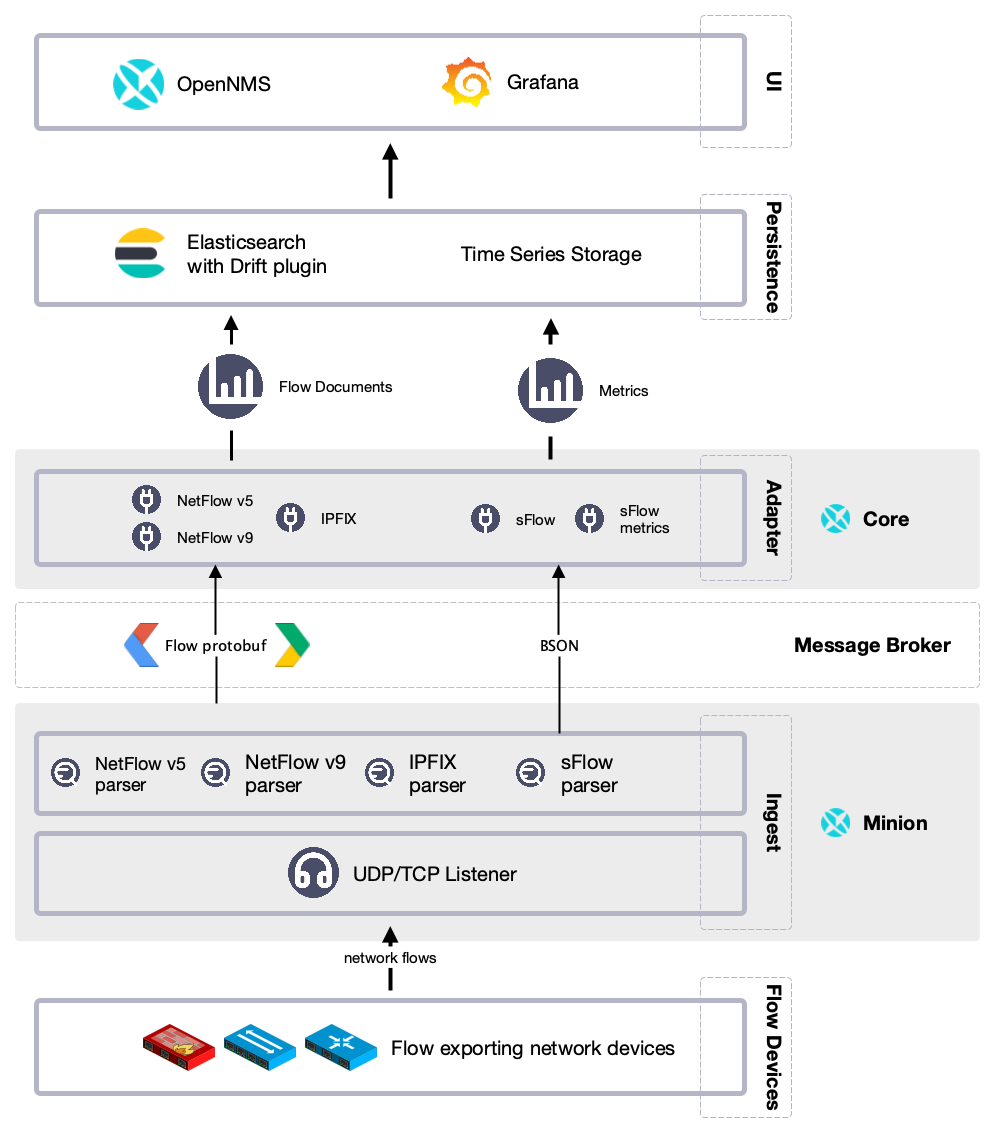
Current Minion packages ship with a working multi-protocol flow listener configuration for v5, v9, IPFIX, and SFlow flow processing and should not require listener configuration changes to receive these protocols. Alternatively, you can configure a listener on a Minion for specific protocols.
Before you begin
Make sure you do the following:
-
Set up a basic flows environment
-
Install one or more Minions on your system
Configure a listener on a Minion
This example enables a generic listener for the NetFlow v5 protocol on Minion.
NetFlow v5 uses the generic UDP listener, but other protocols may require a specific listener.
See the examples in ${OPENNMS_HOME}/etc/telemetryd-configuration.xml, or Telemetryd Listener Reference for details.
|
To enable and configure a listener for NetFlow v5 on Minion, connect to the Karaf Console and set the following properties:
config:edit --alias udp-8877 --factory org.opennms.features.telemetry.listeners
config:property-set name Netflow-5
config:property-set class-name org.opennms.netmgt.telemetry.listeners.UdpListener
config:property-set parameters.port 8877
config:property-set parsers.0.name Netflow-5
config:property-set parsers.0.class-name org.opennms.netmgt.telemetry.protocols.netflow.parser.Netflow5UdpParser
config:update
If using a configuration management, you can create and use the properties file as startup configuration in ${MINION_HOME}/etc/org.opennms.features.telemetry.listeners-udp-8877.cfg.
|
The parsers.X.name value is used as part of the queue or topic name on the message broker and it is therefore important for it to match the queue name defined in the core’s telemetryd-configuration.xml
|
name = Netflow-5
class-name = org.opennms.netmgt.telemetry.listeners.UdpListener
parameters.port = 8877
parsers.0.name = Netflow-5
parsers.0.class-name = org.opennms.netmgt.telemetry.protocols.netflow.parser.Netflow5UdpParser
You must also enable the associated protocol, in this case Netflow-5, on Meridian to process the messages.
See the Telemetryd Protocol Reference for more details.
|
In some scenarios, the exporter’s address is altered due to network address translation.
In this case, use node metadata to identify the exporter.
Use the metaDataNodeLookup parameter to specify a context-key pair in the form of context:key for the lookup.
The value the lookup uses corresponds to the following fields from each protocol:
| Property | Description |
|---|---|
NetFlow v5 |
engineId |
NetFlow v9 |
sourceId |
IPFix |
observationDomainId |
SFlow |
agent_address:sub_agent_id |
BMP |
bgpId |